
Overview
Understanding TwikBot's architecture is essential for partners and agencies responsible for implementing and integrating the platform. This section provides a structured breakdown of how the platform is composed, how its layers interact, and where your implementation work fits within the overall system.
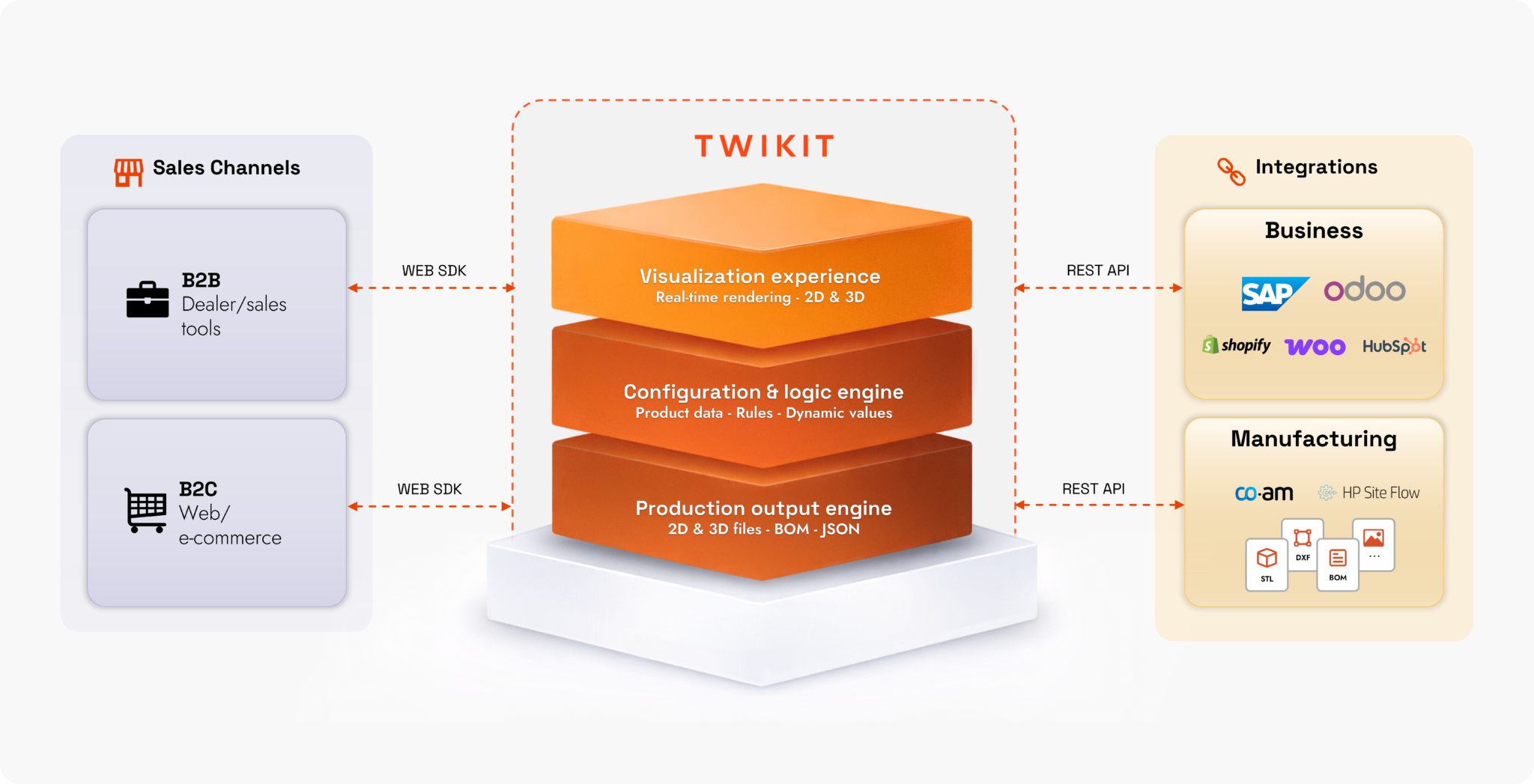
TwikBot is structured around a central platform core, with two distinct sides:
-
Experience side — everything the end user sees and interacts with: the configurator interface, 3D visualisation, and the rendering engine that powers it.
-
Integration side — everything that connects TwikBot to the client's broader technology ecosystem: ERP, CRM, PIM, eCommerce, and production systems.
|
Layer |
Side |
Responsibility |
|---|---|---|
|
Frontend Layer |
Experience |
The user-facing interface through which end users interact with the configurator |
|
Rendering Layer |
Experience |
The 3D visualisation engine responsible for real-time visual output |
|
Twikit Platform |
Core |
The central engine managing configuration logic, CPQ, assets, and data |
|
External Systems |
Integration |
Third-party platforms connected via the integration layer (ERP, CRM, PIM, eCommerce, production systems) |
Each layer is documented in detail in the sub-pages of this section.
High-Level Architecture Diagram
Design Principles
TwikBot's architecture is built around a set of principles that inform how implementations should be approached.
API-first. Every capability in TwikBot is accessible via the REST API. This means the platform can be integrated into any digital environment, and the frontend layer is fully decoupled from the core engine. Partners can build custom front-ends while relying on TwikBot for all configuration, pricing, and output logic.
Headless-ready. The rendering and configuration engine can operate independently of any default UI, allowing agencies to embed TwikBot into existing digital experiences without adopting a fixed interface.
Technology-agnostic output. TwikBot does not prescribe a specific downstream technology for production or enterprise systems. Output formats and integration patterns are configurable to match the client's existing stack.
Separation of concerns. Each layer has a clearly bounded responsibility. This makes it possible to update or replace components — for example, swapping the frontend UI or adding a new ERP connector — without impacting the rest of the system.
Implications for Implementation
As a partner or agency, your implementation work will typically touch all four layers:
-
Frontend Layer — Building or customising the configurator UI, whether using TwikBot's default interface or a headless custom build
-
Rendering Layer — Preparing and optimising 3D assets for real-time rendering performance
-
Twikit Platform — Setting up the configuration logic, pricing rules, asset library, and output templates
-
External Systems — Connecting TwikBot to the client's ERP, CRM, PIM, eCommerce, or production systems via the API and integration layer
The subsequent sub-pages cover each layer in detail, including the technical components, key considerations, and common implementation patterns.