Developer Docs

Modifiers | 2D Modifiers

image-20260318-154528.png

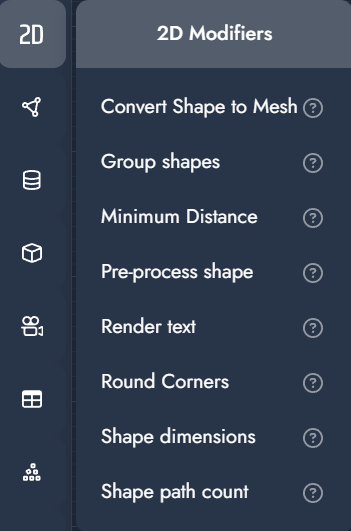
2D Modifiers

2D modifiers operate on vector-based geometry such as shapes, outlines, and text. They are typically used to prepare artwork for cutting, engraving, printing, or extrusion into 3D geometry.

These modifiers are often combined with text, shape, and preprocessing nodes to generate clean, production-ready 2D geometry.

Modifier

Description

Input

Convert Shape to Mesh

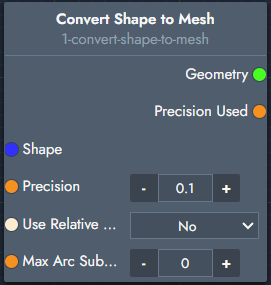
Converts a 2D vector shape into a 3D geometry mesh.

image-20251212-130008.png

Inputs

  • Shape: The input shape.

  • Precision: Determines how closely the mesh follows the shape outline. Higher precision generates more geometry.

  • Use Relative Precision: When enabled, precision is calculated relative to the size of the shape.

  • Max Arc Subdivision: Limits the number of subdivisions used for curved segments.

Outputs

  • Geometry: The generated 3D mesh.

  • Precision Used: The effective precision value applied during conversion.

Group shapes

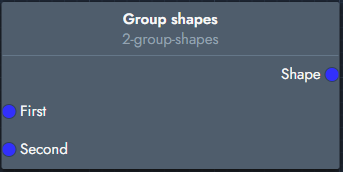
Groups two shapes (2D geometries) into a single shape.

image-20251212-130133.png

Inputs

  • First: The first shape.

  • Second: The second shape.

Outputs

  • Shape: The grouped shape.

Minimum Distance

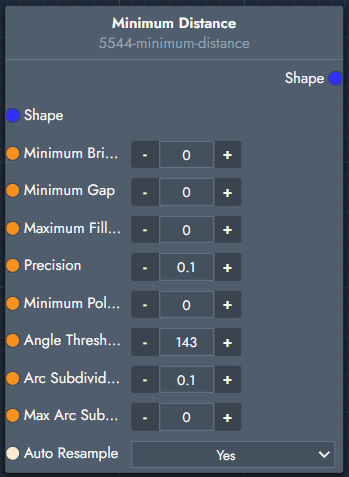
Ensures a shape respects minimum spacing and geometric constraints (e.g. gaps, radii, angles), resulting in clean and manufacturable geometry.

image-20260318-154948.png

Inputs

  • Shape
    Input shape to process.

  • Minimum Bridge
    Desired minimum distance between opposite edges on the inside of a polygon

  • Minimum Gap
    Desired minimum distance between opposite edges on the outside of a polygon

  • Maximum Fillet Radius
    Desired radius of fillet operation performed after this modifier

  • Precision
    Required precision: calculation stops when maximum morphing displacement is less than precision

  • Minimum Polygon Size
    Polygons with an approximate diameter smaller than this value are discarded

  • Angle Threshold In Degrees
    Defines when corners are treated as sharp vs smooth, influencing how the shape is simplified and cleaned.

  • Arc Subdivide Precision
    Controls how accurately curves are approximated during processing, balancing smoothness and performance.

  • Max Arc Subdivide Length
    Limits segment length when subdividing curves to maintain consistent geometric quality.

  • Auto Resample
    Automatically redistributes points along the shape

Outputs

  • Shape
    Processed geometry respecting the defined constraints.

Pre-process shape

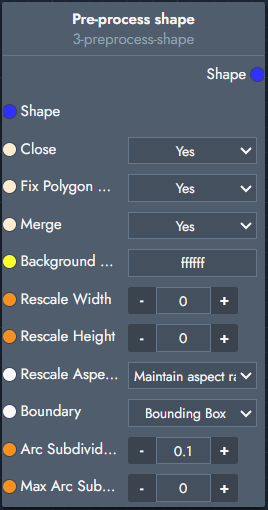
Preprocesses a shape for usage in Twikbot. This includes closing open shapes, fixing polygon winding, and ensuring there are no overlapping polygons.

image-20251212-130304.png

Inputs

  • Shape: The given shape.

  • Close: Closes open shapes.

  • Fix Polygon Winding: Aligns misoriented polygons.

  • Merge: Merges overlapping polygons.

  • Background: Background fill color used during preprocessing.

  • Rescale Width: Rescales the shape to a specific width.

  • Rescale Height: Rescales the shape to a specific height.

  • Rescale Aspect Ratio: Determines how aspect ratio is handled during rescaling.

  • Boundary: Defines the boundary type used for preprocessing (e.g. Bounding Box).

  • Arc Subdivision: Controls subdivision accuracy for curved segments.

  • Max Arc Subdivision: Maximum number of subdivisions applied to arcs.

Outputs

  • Shape: The processed shape.

Render text

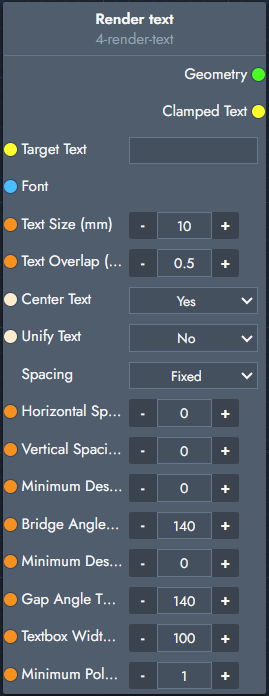
Creates a 2D geometry from text combined with a font.

image-20251212-130701.png

Inputs

  • Target Text: The text to render as a shape. This can be provided as a fixed value or via a text input parameter.

  • Font: The font used to generate the text outline.

  • Text Size (mm): Controls the overall size of the text.

  • Text Overlap (mm): Adjusts spacing between characters.

  • Center Text: Centers the rendered text.

  • Unify Text: Combines all characters into a single shape instead of separate shapes.

  • Spacing

    • Fixed: Uses the fixed spacing defined by the font.

    • Fluent: Uses the minimum distance between characters based on horizontal spacing.

    • Tight: Uses the bounding box of each character.

  • Horizontal Spacing (mm): Horizontal distance between characters.

  • Vertical Spacing (mm): Vertical distance between lines or shapes.

  • Minimum Desired Bridge (mm): Desired minimum distance between opposite edges inside a polygon.

  • Bridge Angle Threshold: Angle threshold used when calculating minimum desired bridges.

  • Minimum Desired Gap (mm): Desired minimum distance between opposite edges outside a polygon.

  • Gap Angle Threshold: Angle threshold used when calculating minimum desired gaps.

  • Textbox Width (mm): Maximum width of the rendered text. Characters exceeding this width are clipped.

  • Minimum Polygon Size (mm): Smallest polygon size allowed inside characters. Smaller polygons are removed.

Outputs

  • Geometry: The rendered text geometry.

  • Clamped Text: The text output after applying the textbox width. This represents the actual text that remains visible when the text is clipped by the available textbox width.

Round Corners

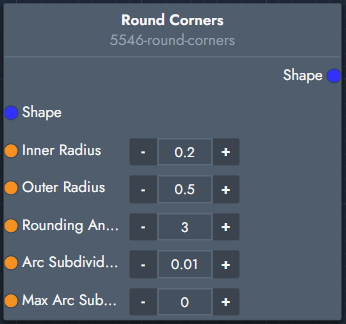
Rounds sharp corners of a shape by applying inner and outer radii, improving smoothness and manufacturability.

image-20260318-160102.png

Inputs

  • Shape
    Input shape to process.

  • Inner Radius
    Radius applied to concave (inner) corners.

  • Outer Radius
    Radius applied to convex (outer) corners.

  • Rounding Angle Threshold
    Defines which angles are considered corners and should be rounded.

  • Arc Subdivide Precision
    Controls smoothness of generated arcs.

  • Max Arc Subdivide Length
    Maximum segment length for arc subdivision.

Outputs

  • Shape
    Shape with rounded corners applied.

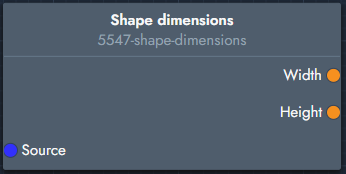
Shape dimensions

Provides the overall dimensions of a shape.

image-20260318-160125.png

Inputs

  • Source
    Input shape.

Outputs

  • Width
    Total width of the shape.

  • Height
    Total height of the shape.

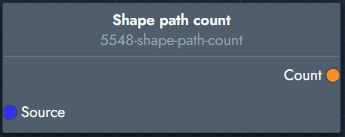
Shape path count

Returns the number of paths (closed or open contours) in a shape.

image-20260318-160200.png

Inputs

  • Source
    Input shape.

Outputs

  • Count
    Number of paths in the shape.