
WebSocket
The Experimental WebSocket Networking Plugin must be enabled before using WebSocket functionality. Enable it via Edit → Plugins.
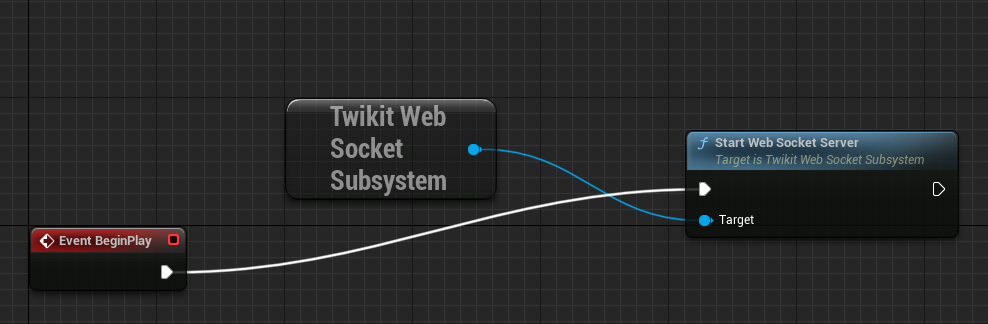
When a game is started using TwikitGameMode, a WebSocket server is automatically started and listens on ws://0.0.0.0:5555. This is logged to the console. If you are using a custom game mode but still want a WebSocket server, you can start it manually from a blueprint:
The WebSocket connection supports the following operations:
-
Loading a product
-
Retrieving information for all parameters in the product
-
Setting product parameter values
Common use cases for the WebSocket connection include embedding Unreal Engine streaming on a webpage, connecting a tablet to a point-of-sale game, and connecting to a VR experience.
Secure WebSocket
Browsers require WebSocket connections to be secure (wss). The socket listener provided by Unreal Engine — and used by the Twikit plug-in — is not secure and listens on plain ws. To expose a secure connection, a reverse proxy is required.
See Unreal Engine | Secure WebSocket: nginx Setup for step-by-step instructions covering both Linux and Windows. The setup proxies incoming wss traffic on port 5000 to the internal insecure listener on port 5555, so only port 5000 needs to be open to the outside world.
Before connecting from a client device — on the client machine (e.g. a tablet), browse to https://<LOCAL IP ADDRESS>:5000 and accept the self-signed certificate. If you skip this step the wss connection will fail.