
TwikitActor exposes a blueprint API with the following methods and events.
Methods
-
Get Parameter Data
-
Set Float Parameter
-
Set Bool Parameter
-
Set String Parameter
-
Load Configuration
-
Save Configuration
Events
-
On Product Loaded
-
On Product Updated
-
On Configuration Saved
Get Parameter Data
Returns a list of all parameters for the loaded product. Example output:
json
{
  "params": [
    {
      "visible": true,
      "enabled": true,
      "id": "Metal",
      "param_type": "boolean-parameter",
      "type": "bool",
      "value": false
    },
    {
      "visible": true,
      "enabled": true,
      "id": "Multiplier",
      "param_type": "number",
      "type": "float",
      "value": 1
    },
    {
      "visible": true,
      "enabled": true,
      "id": "Color",
      "param_type": "text",
      "type": "text",
      "value": "ffffff"
    },
    {
      "visible": true,
      "enabled": true,
      "id": "Texture",
      "param_type": "enum",
      "type": "enum",
      "value": "Happy",
      "choices": [
        { "id": "Happy", "name": "Happy", "value": "Happy", "image": "", "color": "" },
        { "id": "Sad",   "name": "Sad",   "value": "Sad",   "image": "", "color": "" }
      ]
    }
  ]
}
GetParameterData returns all parameters, including those configured as invisible in the product (for example a text input when the product is set to image mode). This avoids confusion caused by a dynamically changing list when interfacing with an actor. The visible field of individual parameters will change when other parameters are set — implementations should handle this accordingly.
param_type
The type of the parameter. This is relevant for image inputs in particular: the type will be string, while param_type indicates the specific image kind.
colormap — a bitmap image. Supported formats are BMP and PNG. The parameter value is a string containing a local file path or URL.
shape — same as colormap but for SVG images.
colorshape — a combined SVG and bitmap representation of the same image. Input can be generated using tools such as potrace. Set the value as the following JSON blob:
json
{
  "type": "csh",
  "data": "{\"width\":500,\"height\":500,\"base64\":\"<snip>\",\"svg\":\"<snip>\"}"
}
base64 is a base64-encoded BMP where every pixel is listed as an RGB8 triplet. svg contains the raw SVG file data.
type
The data type of the parameter value: text, float, bool, or enum.
enum — enum parameters include a choices member listing the available options. id is the option identifier, name is a human-readable label (currently always the same as id). If the option represents a color, color contains a 6-digit hex string. image contains the URL to the option thumbnail if available.
Set Parameter Data
To set a parameter value, use one of the Set…Parameter methods. The correct method depends on the type field returned by GetParameterData. For enum parameters the type is enum but the value is set using SetStringParameter, passing the id of the desired option.
The actor must be fully loaded before its parameters can be read or written. To query the parameter list at game start, use the On Product Loaded event to wait until the product is ready:
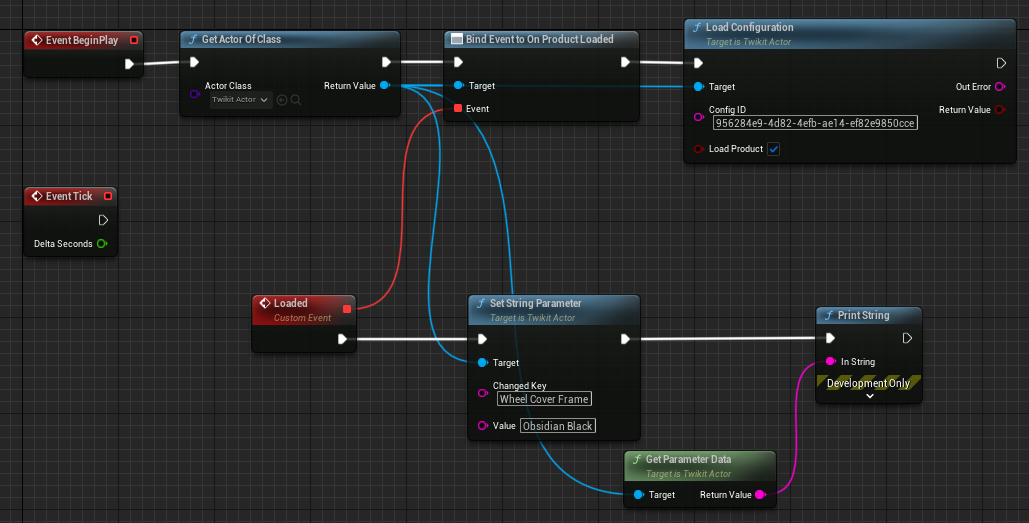
On Product Loaded
Emitted when a product finishes loading. This fires on the initial product load and when a new configuration is loaded with the Load Product option enabled.
On Product Updated
Emitted whenever the product is updated. This fires when the product is first loaded (before the Loaded event) and after any parameter change triggers an update.
On Configuration Saved
Emitted when a configuration is saved. Listen to this event to confirm that saving succeeded and to retrieve the resulting configuration ID.