
Overview
The Twikit REST API provides programmatic access to TwikBot configurations. It is intended for backend and server-side integrations where you need to retrieve, update, or inspect configurations outside of the browser-based configurator experience.
If you are embedding a configurator directly in a website or frontend application, use the [Web SDK] instead. The REST API and Web SDK are complementary — most integrations will use the Web SDK for the frontend experience and the REST API for backend processing, order handling, or system integrations.
Base URL
All API requests are made to:
https://api.twikit.com
Authentication
The Twikit REST API uses OAuth 2.0 Machine-to-Machine (M2M) authentication, following the client_credentials grant type as defined in OAuth 2.0 RFC 6749. This flow is designed for server-to-server communication where no user interaction is involved.
Authentication Flow
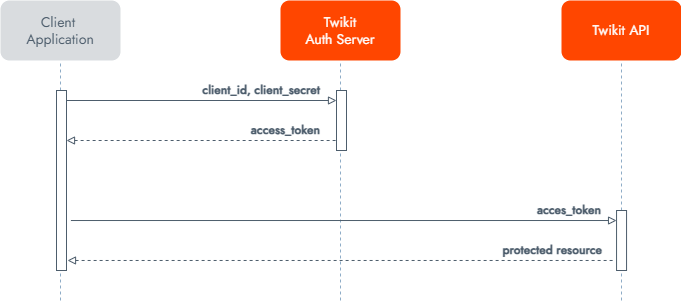
Requesting Access
To get started, contact your Twikit account manager or technical contact to request an authorization grant. You will receive a client_id and client_secret pair via a secured link, valid for a limited time.
Obtaining a Token
Exchange your credentials for an access token by sending a POST request to the Twikit authentication server:
bash
curl --location 'https://dev-idp.twikit.com/oauth2/token' \
--header 'Content-Type: application/x-www-form-urlencoded' \
--data-urlencode 'grant_type=client_credentials' \
--data-urlencode 'client_id=YOUR_CLIENT_ID' \
--data-urlencode 'client_secret=YOUR_CLIENT_SECRET'
A successful response returns:
json
{
    "access_token": "eyJra...Pydlpg",
    "expires_in": 3600,
    "token_type": "Bearer"
}
|
Field |
Description |
|---|---|
|
|
The token to include in subsequent API requests |
|
|
Token validity in seconds (3600 = 1 hour) |
|
|
Always |
Using the Token
Include the access token in the Authorization header of every API request:
Authorization: Bearer YOUR_ACCESS_TOKEN
Tokens are not refreshable — request a new token when the current one expires.
Scopes
Access to specific API resources is controlled via scopes (e.g. configurations/configurations.read). The scopes available to your client application are agreed upon during the initial access request and granted by the Twikit technical team. Defining a scope on the token request is optional — if omitted, the token will include all scopes authorized for your client application.
Security Best Practices
-
Never hardcode credentials in your application. Store
client_idandclient_secretsecurely using environment variables or a secret management service. -
IP Whitelisting — If your client application has a fixed IP address, share it with Twikit to restrict API access to that address only.
-
Mutual TLS (mTLS) — For additional security, Twikit can provide certificates for mutual authentication between client and server. Contact your Twikit technical contact to set this up.
Available Endpoints
The API currently exposes two groups of endpoints:
Status Check the operational status of the Twikit API service.
Configuration Interact with TwikBot configurations programmatically. Available operations include:
|
Method |
Endpoint |
Description |
|---|---|---|
|
GET |
|
Retrieve a configuration by ID |
|
GET |
|
Check compatibility of a configuration |
|
POST |
|
Update multiple configurations |
|
POST |
|
Update a specific configuration |
|
GET |
|
Get a summary of a configuration |
|
GET |
|
Get the parameters of a configuration |
|
GET |
|
Get a filtered configuration by ID |
Full API Reference
The full interactive API reference, including request and response schemas and the ability to test endpoints directly, is available at:
Need Help?
For access requests or technical questions, contact us at support.twikit.com.